
Cyanotype Dye Journal
June 2026 improvements
I finally used a hikibake brush to apply sensitizer (a new one was retrieved from Japan in the spring). It worked better than a hake brush, but the improvement was not so massive. It’s still easy, especially right after a dip in the sensitizer, to get too much dye flowing off the brush onto the fabric. I’m going to keep using the brush, though. It’s definitely an improvement.
Exposure time with OHP film
You must use the OHP film when doing an exposure time test! I think I forgot to do this in the past…
I also realized I’ve been underexposing the Stouffer step wedge. Annette Golaz’s instructions are too brittle. Instead, I’m performing experiments to determine the correct exposure time and using this calculator: https://www.alternativephotography.com/exposure-time-calculator-stouffer/.
Exposure time: 90 minutes. Darkest first step: still step 1. I’ve been underexposing my prints!
Exposure time: 6 hours. Darkest first step:
Curving the negative for optimal tonal range
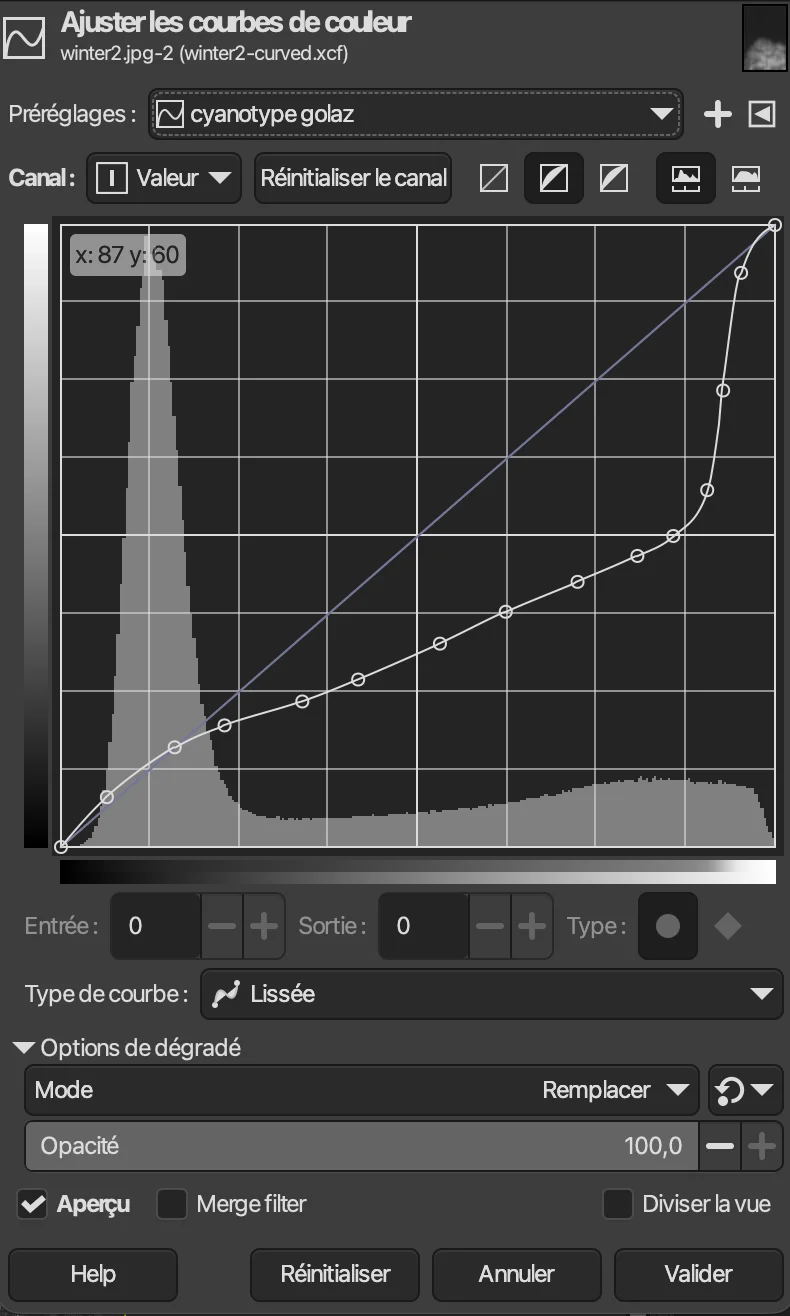
I’ve been using the Golaz curve (see below) to curve my negatives, which has worked well enough. However, it’s likely that the optimal curve for my setup looks slightly different. I found instructions on how to experimentally determine the right curve from Jonah Calinawan’s blog: https://jonahcalinawan.com/blog/cyanotype-digital-negative/.
ChartThrob: https://github.com/joker-b/ChartThrob/.
Still deciding whether to do this. It’s a lot of work, and I need to get photoshop. Maybe I should get Claude to port it over to GIMP…
June 2025 improvements
For Ben’s outfit.
I used the instructions from Annette Golaz’s book, Cyanotype Toning.
Improvements
- 10/10 solution of potassium ferricyanide + ferric ammonium citrate
- Used distilled water to create the sensitizer solutions
- Used the Stouffer TP4X5-31 Step Wedge to determine exposure time
- Scoured the fabric before printing (make sure to neutralize all alkalinity for cellulose!)
- Used the Golaz curve after making images black + white and inverting.
- Bought an inkjet printer and printed my own negatives. Photo Matte/Presentation Matte mode with high quality. Make sure to tape a piece of printer paper behind the transparency paper so the printer can print properly
Golaz Curve
Mistakes
- Soaking the prints too long in water to remove the rings—the water fades the prints as well as the rings.
- Applying dye too lightly to the fabric. this leads to unintelligible prints